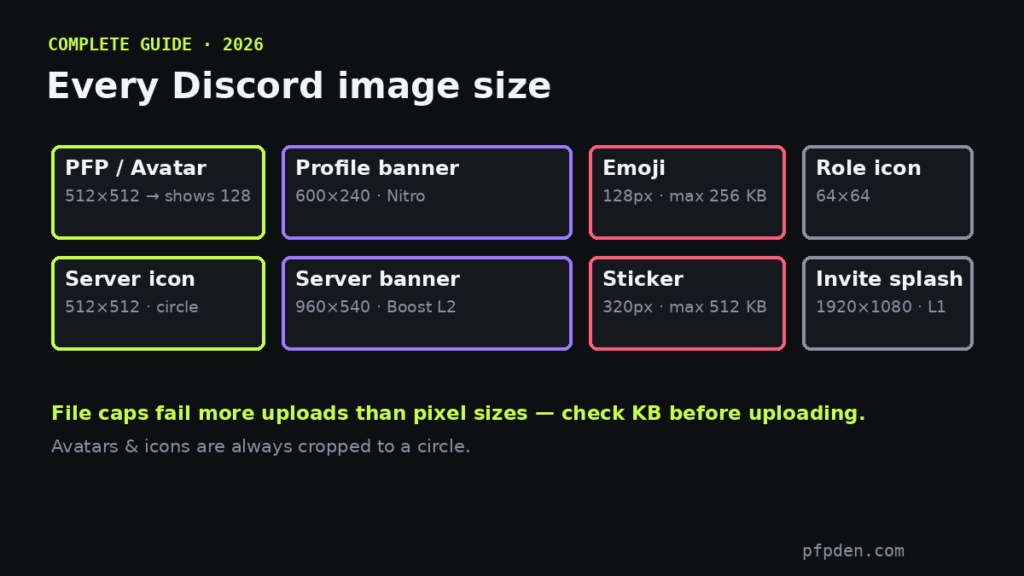
Quick answer: upload your Discord PFP at 512×512 pixels. Discord displays it at 128px and smaller, always cropped into a circle — so a sharp 512 square with the subject centered is the perfect source. But the PFP is only one of Discord’s image surfaces, and each has its own size and its own file cap. Here is the whole system:
PFP & server icon get the circle preview. Profile banner shows the avatar-overlap zone. Emoji & stickers get a real file-size check against Discord's caps (256 KB / 512 KB) — the thing that actually fails uploads.
Every Discord image size (2026)
- Profile picture (PFP): upload 512×512, displays at 128px in a circle. GIF avatars need Nitro. Grab an original PFP or prep yours with the PFP Maker.
- Server icon (icon guide): 512×512, displays at 128px, circular crop — same rules as avatars.
- Profile banner (full banner guide): 600×240 (5:2 ratio). Nitro feature. Your avatar overlaps the bottom-left corner, so keep that area clear.
- Server banner: 960×540 minimum (16:9); 1920×1080 uploads look sharpest on large screens. Requires Boost Level 2 — Level 3 to animate.
- Invite splash: 1920×1080 (16:9). Requires Boost Level 1.
- Custom emoji (emoji guide + resizer): 128×128, max 256 KB. Renders tiny in chat (~22-32px), so bold simple shapes only.
- Stickers (sticker guide): 320×320, max 512 KB, PNG or APNG.
- Role icons: 64×64 — keep them symbol-simple.
The two things that actually break uploads
1. File caps, not pixels. Most failed emoji and sticker uploads are file-size rejections: a many-frame GIF blows past 256 KB easily even at the right dimensions. Compress before uploading.
2. The circle crop. Avatars and server icons are masked to a circle — everything in the corners of your square disappears. Keep the subject centered with padding, and check the result at real sizes in the free PFP Maker circle preview before uploading. The resizer outputs every size on this list, including both banners.
Deep dives
Each surface has its own traps — these guides go all the way down: banner sizes (both types + ratios), server icons (the background-color trick), emoji sizes (the 256 KB cap), stickers (the APNG rule), and changing your pfp on any device. Off Discord, the Instagram profile picture guide covers IG’s own crop and compression rules.
Why avatars go blurry
Three causes: the source was smaller than 512px (upscaling can’t invent detail), you uploaded a huge file that Discord recompressed, or the crop cut into the subject. Start from a clean 512+ square and all three disappear.
FAQ
What is the best Discord PFP size?
Upload a 512×512 square. Discord displays it at 128px and smaller in a circle, and 512 scales down perfectly sharp.
What size is a Discord banner?
Profile banner: 600×240 (Nitro). Server banner: 960×540 minimum, 1920×1080 for the sharpest result (needs Boost Level 2).
What size is a Discord server icon?
512×512 pixels, displayed at 128px in a circle — keep the logo centered and out of the corners.
What size are Discord emojis and stickers?
Emojis: 128×128 under 256 KB. Stickers: 320×320 under 512 KB. The file cap fails more uploads than the dimensions do.
Can a Discord PFP be a GIF?
Animated avatars are a Nitro feature — free accounts display static images.